
How to carry your phone while running
Updated · 7 min read
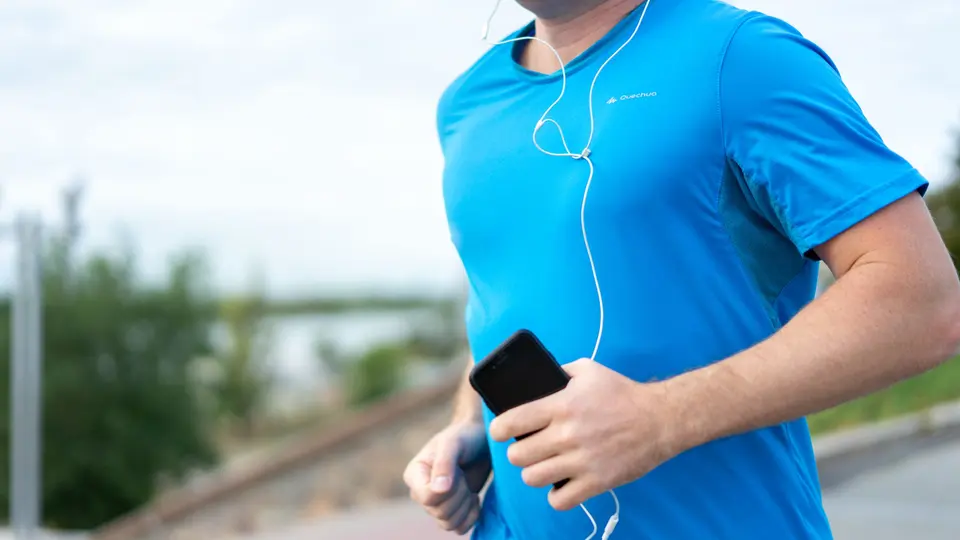
In short: The most comfortable way to carry a phone while running is close to your body’s center, where it bounces least: a snug running belt around the waist, or a back or side pocket in fitted shorts or tights. Armbands keep the screen easy to see but can feel heavy with a big phone. A handheld bottle with a phone pocket suits runs where you also want water. Whatever you choose, test it on a short run and check that nothing bounces or rubs.
Why carry it at all
A phone tracks distance and pace, plays music, and lets you call for help or a ride. The X Challenge app records each session by GPS on your phone, and it keeps recording with the phone locked and tucked away, so you do not need it in your hand. Set the run going before you put the phone away, and stop it once you finish. Many runners also like having it for safety on solo runs.
Phones are bigger and heavier than they were, which is why carrying one comfortably takes some thought. The heavier the phone, the more it matters to keep it close to your waist, where your body moves least.
Your options compared
| Option | Good for | Watch out for |
|---|---|---|
| Shorts or tights pocket | Short runs, no extra gear | Loose pockets swing; big phones may not fit |
| Tube belt | Almost any run; very little bounce | Getting the phone out takes a second |
| Zip waist belt | Phone plus keys and cards | Needs to sit snug on the hips |
| Armband | Seeing the screen while running | Heavy phones can slip and feel lopsided |
| Handheld with pocket | Runs where you also carry water | Takes up one hand |
| Running vest | Long runs with water and layers | More than you need for short runs |
Most runners end up with two options: a pocket or belt for everyday runs, and a handheld or vest for long or hot days. You do not need one of everything. Start with whatever you already own, such as shorts with a zip pocket, and buy a belt only if that does not work.
Running belts
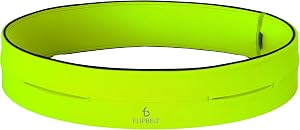
FlipBelt Classic Running Belt
Tube waist belt for phone/keys (no bottle)
List price at flipbelt.com, checked Nov 6, 2026

Nathan Adjustable-Fit Zipster 2.0NS30530-00001-OSFM
Waist belt with buckle; three weather-resistant zip pockets
List price at nathansports.com, checked Nov 6, 2026
Prices are the brand’s list price on the day checked. Some links are affiliate links: as an Amazon Associate, X Challenge earns from qualifying purchases, at no extra cost to you.
The FlipBelt is a stretchy tube you step into and slide the phone through an opening, then flip so the openings face in. It comes in sizes, so measure your waist. The Zipster 2.0 adjusts with a buckle and has zip pockets, which some people find quicker to open. Wear either one low on the hips, where the belt bounces least.
To stop a belt bouncing:
- Wear it low, across the hip bones, not at the waist.
- Put the phone at your back or side, not on your belly.
- Snug it so it does not slide when you jog in place, but loose enough to breathe.
- Balance heavy items: phone on one side, keys on the other.
Armbands

Nathan Super 5K Smartphone ArmbandNS4923-0031-00
Neoprene phone armband; fits most smartphones; water-resistant
List price at nathansports.com, checked Nov 6, 2026

Nathan StrideSport Smartphone CarrierNS4947-0015-00
Arm carrier with a clear window over the screen; reflective details
List price at nathansports.com, checked Nov 6, 2026

Nathan SonicStorm Smart Phone CarrierNS4942-0028-00
Nathan's largest arm carrier, for big phones; inner stash pocket
List price at nathansports.com, checked Nov 6, 2026
Prices are the brand’s list price on the day checked. Some links are affiliate links: as an Amazon Associate, X Challenge earns from qualifying purchases, at no extra cost to you.
Armbands sit on the upper arm. The Super 5K is a simple neoprene sleeve. The StrideSport has a clear window so you can see the screen. The SonicStorm is Nathan’s largest, for big phones plus a key. Check the size against your phone before you order, especially with a thick case.
Wear an armband on the upper arm, high enough that it does not slide toward the elbow, and switch arms on long runs. Take the case off if the phone fits only snugly with it on. Armbands get sweaty in summer, so rinse them along with your kit.
Pockets and handhelds
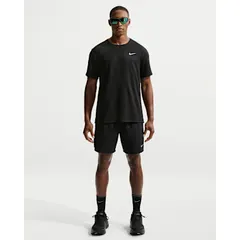
Nike Challenger Dri-FIT 7" Brief-Lined Running ShortsDV9359-010
Men's; 7" inseam, brief liner, three pockets
List price at nike.com, checked Nov 6, 2026 · Photo: nike.com
$42Brand site
Nathan SpeedDraw 2 Flask 18ozNS70840-00010-OSFA
18 oz handheld; mesh pocket fits most phones, small zip pocket
List price at nathansports.com, checked Nov 6, 2026
Prices are the brand’s list price on the day checked. Some links are affiliate links: as an Amazon Associate, X Challenge earns from qualifying purchases, at no extra cost to you.
Shorts with a zip or back pocket are the simplest answer if your phone fits. The Challenger shorts have three pockets. The SpeedDraw 2 flask has a mesh pocket that fits most phones, so one hand holds both water and phone on hot or longer runs. Look for “phone pocket” in the description, and check the size.
Running tights and many newer shorts have a back pocket sized for a phone, which holds it tighter than a side pocket. Loose side pockets in everyday shorts are the worst option: the phone swings, pulls the waistband down and can fall out. If your phone is large, measure it with the case before you buy anything, because many pockets and armbands list the largest screen size they fit.
Which to choose
- Runs under 30 minutes, small phone: a shorts pocket.
- Most beginners: a running belt. It suits any phone and almost any distance.
- You check the screen often: an armband with a clear window.
- Hot days or runs over an hour: a handheld with a phone pocket, or a belt with a flask.
- Long runs with water, gels and a jacket: a running vest. See how to carry water when running.
Tips for running with a phone
- Lock the screen before you start so it does not pause or end the run in your pocket.
- Keep one earbud out, or the volume low, near traffic.
- Use the lock-screen controls or earbud taps for music, so the phone can stay put away.
- Download playlists or podcasts before you leave, so they play without signal.
- Put the phone in a small zip bag on rainy or very sweaty days.
- Charge it before long runs. GPS and music both use battery.
- Turn on the emergency SOS feature and add an emergency contact to your lock screen.
- Clean the belt or armband with your running clothes every week or two. Sweat left in the fabric smells and wears it out.
- Try a new carrier on a short loop near home first, so a bounce or rub is a small problem.
- Carry a card and a key in the same place every time, so you never leave without them.
- Share your location with someone on early or late solo runs. See running alone safely.
Common questions
- Does a phone bouncing matter? It is annoying, and it can rub. A snug belt or tight pocket stops it.
- Is a belt or armband better for a big phone? A belt. Heavy phones slip on the arm.
- What about a phone holder on a vest? Most running vests have a front pocket for a phone, which is handy on long runs where you also carry water.
- Will an armband hurt my form? A heavy phone on one arm can feel lopsided. Switch arms halfway, or use a belt.
- Can I just hold it? You can, but a gripped phone tenses the hand and shoulder over a long run, and it is easy to drop.
- Will sweat damage my phone? Most recent phones resist splashes, but sweat and rain add up. A zip bag or a water-resistant pocket is cheap insurance.
- Do I need my phone for the challenge? The app records your run from the phone. If you run without it, you can enter the distance by hand afterward, for example on a ODIN day.
Prices are list prices at the brand’s own store on the day checked. They change, and sales are common, so check the live page before you buy. We picked by specs, fit notes and price; we have not run in every item.
Challenges from this guide
Or take the whole set
More: all guides · how it works · every challenge